
Point of sale for farms and delivery businesses
Sell at the counter from the same catalog.
DBP POS is a point of sale for farms and delivery businesses. Your staff ring up in-person sales from the products you already set up in Delivery Biz Pro, then take the card payment on a PAX A920 Pro terminal through DBPay. It runs in a web browser on a tablet or computer, so there is nothing to install.
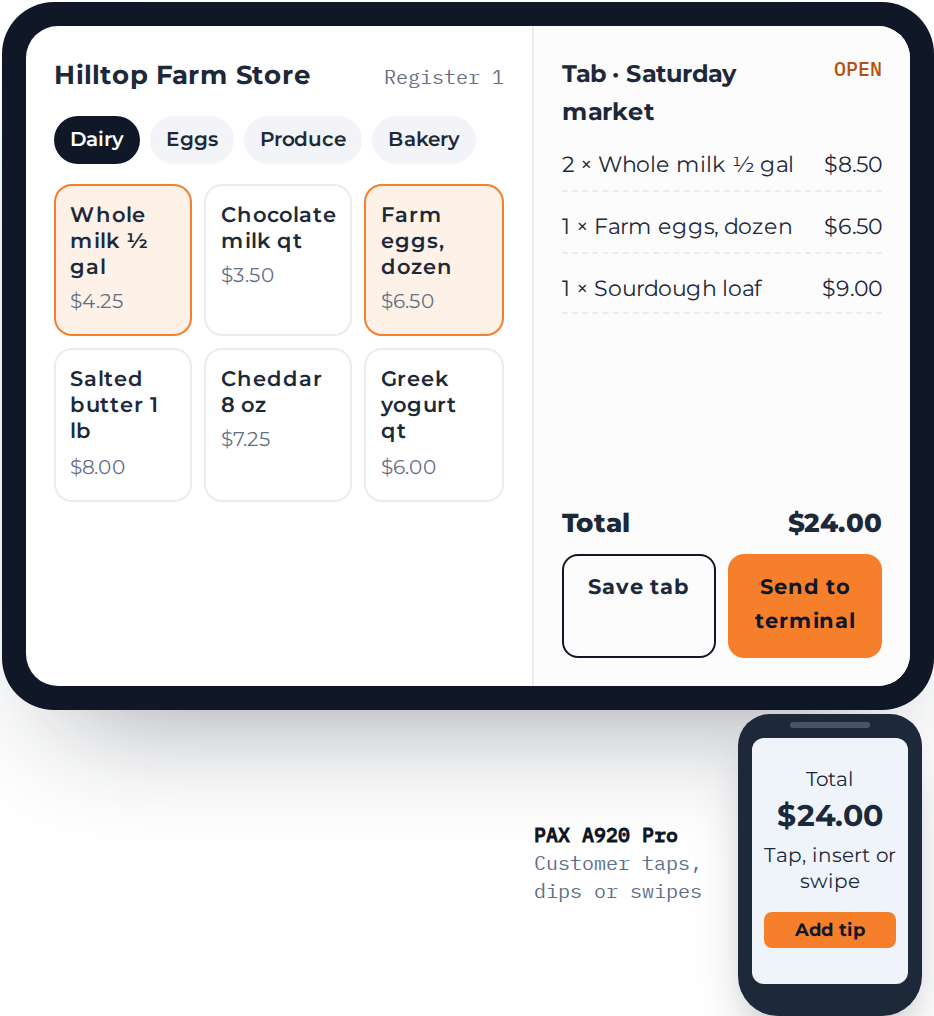
Example store and prices.
At a glance
DBP POS is a browser-based point of sale for farms, farm stores, markets, pickup days, delivery routes and events. Staff sell from the product catalog you already keep in Delivery Biz Pro and take credit card payments on a PAX A920 Pro terminal through DBPay, with open tabs and tips built in.
Where it fits
A point of sale for farms, markets and every sale made face to face.
Farm stores
Ring up walk-in customers from the same products you deliver.
Markets and pop-ups
Take cards at a stall without setting up a second product list.
Pickup days
Sell the extra loaf or dozen eggs when customers collect their order.
On the delivery route
Drivers sell extras at the door with a handheld terminal.
Events and bars
Keep a tab open for a table or a guest and close it at the end.
How a sale works
From the first tap to a paid order.
Staff sign in to the register for their location, build the order from your catalog and send the total to the card terminal.
Staff open the register
Each login is set up for a location, so staff only see the register they work at.
Tap products from your catalog
The products and prices you set up in DBP, grouped by category.
Charge it or keep a tab
Send the total to the terminal, or save the order as a named tab and add to it later.
Card payment through DBPay
The customer taps, dips or swipes. The payment settles through your DBPay account.
Why a DBP register
One product list for delivery and the counter.
Many delivery businesses run a separate card reader and a separate product list for in-person sales. DBP POS sells from the catalog you already keep up to date.
No second catalog
Products and prices come from your DBP account. Add a product once and you can sell it online and at the counter.
One payments provider
In-person card sales go through DBPay, the same payment processing you use for online orders.
Runs in a browser
Use a tablet or computer you already have. There is no app to download and nothing to update.
Tabs and tips built in
Save an order under a name and charge it when the customer is ready. You set the tip options staff can offer.
What's included
What it does today, and what we are building next.
Available now
- Sell from your DBP product catalog, grouped by category
- Credit card payments on the PAX A920 Pro: tap, dip or swipe
- Open tabs you can add to and close later
- Manage tips: choose the tip amounts offered at payment
- A Bluetooth card reader as a backup terminal
- Staff logins set up per location
- Payments processed through DBPay
On the roadmap
- Counter sales that update your DBP inventory
- Barcode scanners and scales for items sold by weight
- A cash register on the terminal itself: pick items from your catalog on the PAX, with no separate tablet
- Your logo and colors on the register
One platform
The counter is one more place to sell.
DBP POS sits next to your web shop and the Mobile Shop App. All three sell from one DBP account, and payments run through DBPay.
Questions
What merchants ask about POS.
What hardware do I need?
A PAX A920 Pro card terminal, plus a tablet or computer with a web browser to run the register. You can add a Bluetooth card reader as a backup.
Do I need DBPay?
Yes. DBP POS takes card payments through DBPay, so you need an approved DBPay merchant account.
Which payment types can I take?
Credit cards, by tap, chip or swipe on the terminal. Debit, EBT and gift cards are not supported at the counter yet.
Will counter sales update my inventory?
Not yet. Today the register sells from your DBP catalog, but counter sales do not change your DBP inventory. Connecting them is on our roadmap.
Can I keep a tab open and take tips?
Yes. Save the order under a name, add items as you go, and send it to the terminal when the customer is ready to pay. You choose the tip amounts customers are offered.
How do I get started?
Book a demo and we will walk you through the register, check your DBPay setup and help you choose a terminal.
Bring your counter sales into DBP.
See the register on a call and find out what you need to start taking payments.